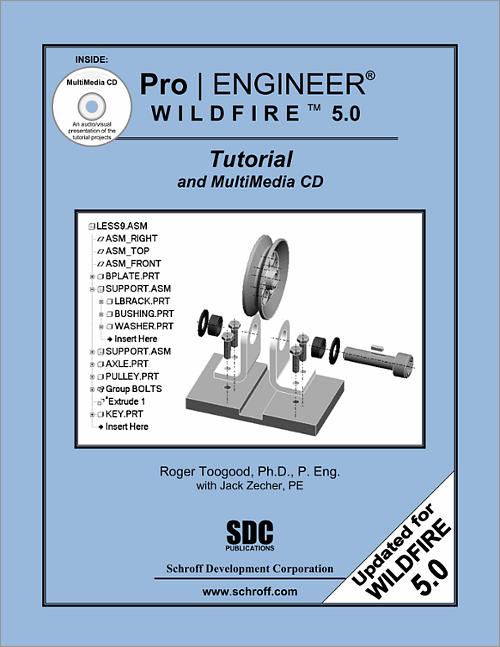

Pro/ENGINEER Wildfire 5.0 Tutorial and MultiMedia CD
- Description
- Contents
- Downloads
- Instructor Resources
- More Info
- Details
Description
Key Features
- Designed for novice users
- Uses step-by-step tutorials
- Includes a multimedia CD with video tutorials
- Explains not only how but also why commands are used
- Covers part and assembly creation, creating engineering drawings and parametric solid modeling
In Detail
The eleven lessons in this tutorial introduce students to Pro/ENGINEER's Wildfire 5.0 design capabilities. The tutorial covers the major concepts and frequently used commands required to advance from a novice to an intermediate user level. Major topics include part and assembly creation, and creation of engineering drawings. Also illustrated are the major functions that make Pro/ENGINEER a parametric solid modeler. These topics are further demonstrated in the video files that come with every book.
Although the commands are presented in a click-by-click manner, an effort has been made, in addition to showing/illustrating the command usage, to explain why certain commands are being used and the relation of feature selection and construction to the overall part design philosophy. Moreover, since error recovery is an important skill, considerable time is spent exploring the created models (in fact, intentionally inducing some errors), so that users will become comfortable with the "debugging" phase of model creation.
At the end of each lesson is a short quiz reviewing the new topics covered in that chapter. Following the quiz are several simple "exercise" parts that can be created using new commands taught in that lesson. In addition to these an ongoing project throughout the book is also included. This project consists of several parts that are introduced with the early lessons and finally assembled at the end.
About the Multimedia CD
The MultiMedia CD bundled with this textbook contains an audio/visual presentation of all the tutorial exercises found in the textbook. The Multimedia CD provides students with diverse learning tools and experiences that reinforce each lesson. Students will have an excellent understanding of the material and feel confident about completing the lessons when they view the MultiMedia files prior to completing the detailed lessons found in the textbook. Students who are visually orientated learners will find this CD to be a very valuable asset to them.
The tutorials in this textbook cover the following topics:
- Introduction to the program and its operation
- The features used in part creation
- Modeling utilities
- Creating engineering drawings
- Creating assemblies and assembly drawings
Table of Contents
- Introduction to Pro/ENGINEER
- User Interface, View Controls and Model Structure
- Creating a Simple Object (Part I)
- Creating a Simple Object (Part II)
- Revolved Protrusions, Mirror Copies, Rounds, and Chamfers
- Modeling Utilities and the 3 R's
- Datum Planes and Sketcher Tools
- Patterns and Copies
- Engineering Drawings
- Assembly Fundamentals
- Assembly Operations
- Sweeps and Blends
Appendix
Index
Downloads
The files for Pro/ENGINEER Tutorial are located in the Supp_Files folder on the MultiMedia CD, or you may download them in the zip file for your software license:
For additional information on downloading, unzipping, and using these files visit the downloads section on our Frequently Asked Questions page.
Instructor Resources
The following downloadable resources require that you are registered, logged in and have been authenticated as an instructor.
The author has provided three downloads for instructors to use. They contain exercises, lessons and project files.

More Information
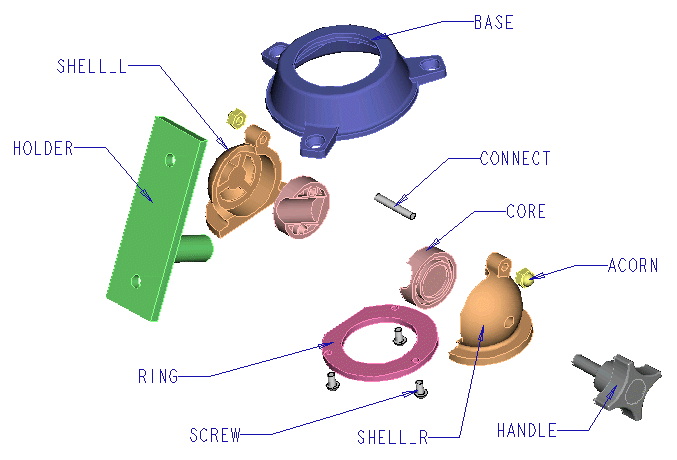
About the Panavise part modeled in this tutorial:
The Panavise is used as a modeling project in the Pro/ENGINEER Tutorial published by SDC Publications. Some parts are made at the end of each lesson (in addition to Questions for Review and other Exercises), and assembled using techniques discussed in the last two lessons.
The drawings used in this tutorial are drawings of a product patented by Panavise Products, Inc. and the drawings are used with the express written permission of Panavise Products, Inc., Reno, Nevada.
The name Panavise is a registered trademark of Panavise Products, Inc., Reno, Nevada, and is used with the express written permission of Panavise Products, Inc.
The image below shows all the parts in the Panavise.
Product Details
| Publisher | SDC Publications |
| Authors | Roger Toogood Ph.D., Jack Zecher P.E. |
| Media Types | Print Book, eBook, Videos |
| Primary Languages | English |
| Published | August 31, 2009 |
| User Level | Beginner |
| Pages | 416 |
| Binding | Paperback |
| Printing | Black and White |
| Print ISBN | 978-1-58503-535-9 |
| Print ISBN 10 | 1585035351 |
| eBook ISBN | 978-1-63056-111-6 |